
Mind maps
Collaborative topic graphs, authorized player editors and 37 typed resource links.
Documentation · Português · Campaign management
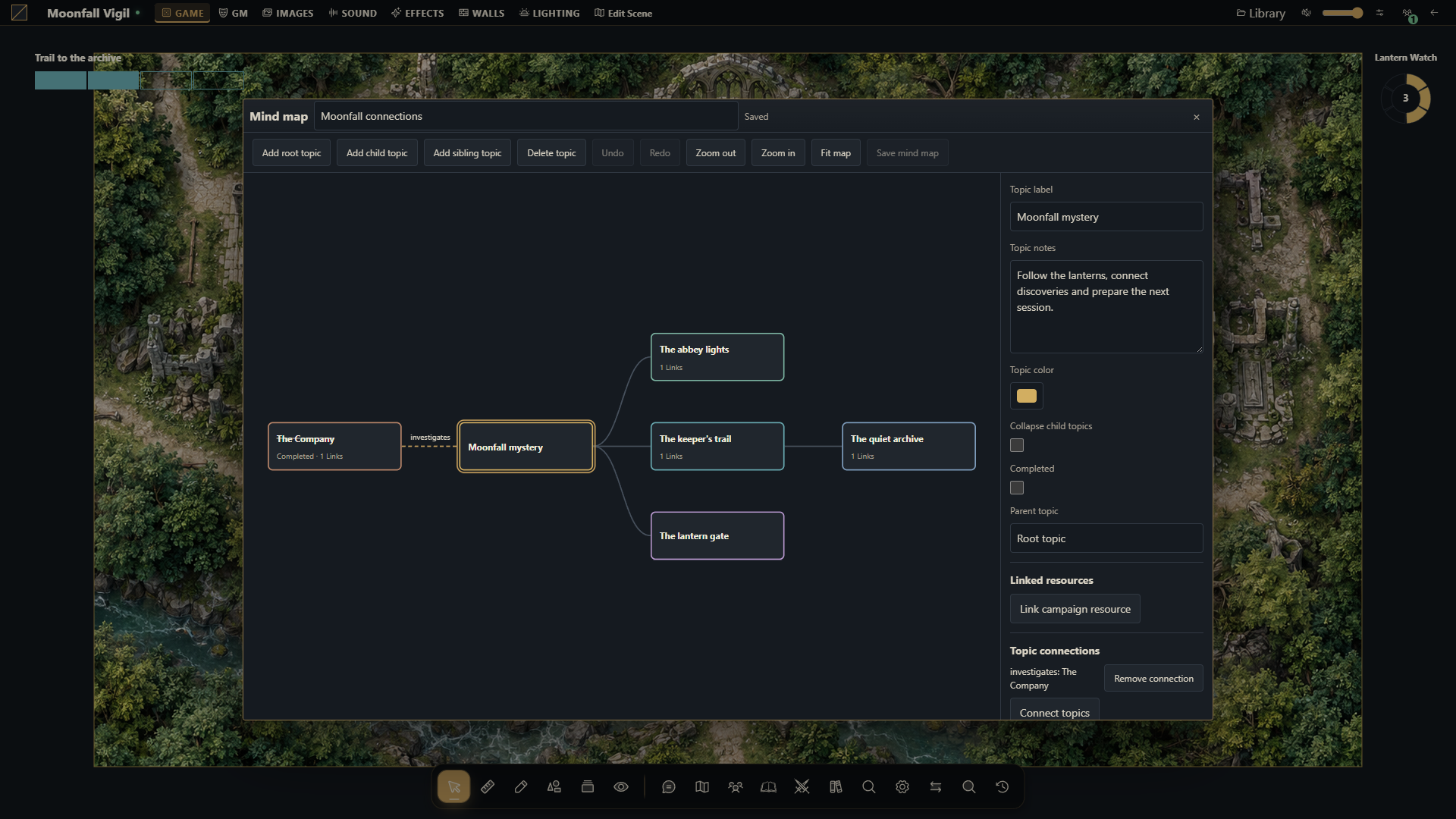
Open Mind maps from its icon in the table's lower dock or in the campaign manager. Both interfaces use the same saved campaign graphs. The visual reference is MindMeister: a central topic, branches, movable topics and connections. This implementation runs inside Gravewright and needs no external account or service.
Create and organize
The GM creates a named map, chooses campaign or scene scope, and configures visibility and editors. New maps are private to the GM. Choose a map to open its editor; add root, child or sibling topics and select a topic to edit its label, notes, color, completion and collapsed branches. Reparenting rejects cycles. Additional labeled connections can relate topics outside their parent branch.
Drag topics to position them. Drag empty canvas to pan, use the zoom controls or wheel, and choose Fit map to frame the graph. Undo and redo operate on the local draft. Save mind map writes the graph with its expected version. Closing a modified graph asks whether to discard its draft using the native modal. A conflict preserves the local draft and offers an explicit reload of the saved graph; it never silently overwrites another editor's version.
The directory is shared between interfaces, while navigation and zoom are local to the open editor. The campaign manager remains a GM workspace; authorized players use the tabletop editor.
Resource links
Link campaign resource searches authorized native campaign resources. Links store typed identities, not copied documents or an access grant. The catalog supports these 37 types:
| Domain | Link targets |
|---|---|
| Characters | Actors, their accessible assets including PDF sources, character folders |
| Items | Items and folders |
| Journals | Diaries, quests, quest boards, roll tables, readable pages, attachments, folders and board entries |
| Scenes | Scenes, folders, native scene objects, raster tiles, drawings, tokens and encounters |
| Library | Map images and file folders |
| Progress | Clocks and discovered clues, subject to their native visibility |
| Audio | Tracks and playlists |
| Cards | Decks, individual cards, deck definitions and card artwork |
| Compendiums | Campaign/installed packs and entries, plus native entry attachments |
| Preparation | Session plans and timeline events |
| Authoring | MapBuilder projects, behavior templates and PDF mapping templates |
| Other | Visible chat messages and other mind maps |
Native scene objects include walls/doors, lights, images and controllers, particles, shaders, markers, journal pins, spatial sounds and zones. Each follows its own native projection: GM layers, secret barriers, private pages, unrevealed clues and cards unavailable to the viewer do not become discoverable links. Internal package files without a native campaign entity are not separate link targets. Chat search follows the native recent-history window; an existing link can still resolve an older message if the viewer retains access.
Opening a link rechecks its current permission. Missing and denied targets use the same neutral unavailable state; hidden target IDs, names and URLs are absent from player payloads. Editing another topic preserves such a link through an opaque placeholder. Removing the link removes it from the graph. Authored topic text belongs to the whole map's audience: write private notes in a private map.
Collaboration and permissions
Only campaign GMs create/delete maps, change their scene scope, configure visibility and grant editors. Visible to players permits reading; selected player editors can also read and modify a private map. All GMs can edit. An authorized player can rename a map and edit its graph, but cannot change its access list. Streamers are always read-only. Scene scope additionally requires native access to that scene, even for a selected editor.
Table clients receive committed invalidations and re-read their own projection. Campaign management refreshes through its existing HTTP lifecycle. Permission changes are checked again on reads, saves and receipt retries. A revoked editor cannot continue writing or use an old receipt to retrieve private data.
MapBuilder
Smart Objects offer two nodes:
| Node | Behavior |
|---|---|
Open mind map (openMindMap) | Opens an authorized map, optionally focused on a topic, for the triggering user, players or selected users |
Control mind-map topic (mindMapNode) | Completes, resets or toggles the configured topic's completion |
Bindings must belong to the campaign and use campaign scope or the current scene. A GM-authored control delegates only that specific effect through the native service and requires an active campaign GM; it grants no general player editing rights. Opening never bypasses recipient permissions. Deleted targets remain repairable bindings. Simulation describes the effect; server rehearsal rolls back data, receipts and notifications. Delayed execution rechecks targets.
Storage, limits and APIs
A campaign supports 64 maps. Each graph supports 500 topics, 1,000 additional connections, 16 resource links per topic, 2,048 links overall and 1 MiB of JSON. Labels and connection text are limited to 240 characters, notes to 8,000, and coordinates to ±100,000. IDs are UUIDs; references also support native numeric and composite identities through their registered type.
Campaign copies/exports select Mind maps separately. Omitting scenes also omits scene-scoped maps. Typed links remap to copied resources, while excluded targets become inert and authored text/local topic IDs stay exact. Portable archives clear source editor grants; snapshots restore grants in the same campaign. A campaign archive does not replace an installation backup.
Python exposes api.mindmaps.state, read, resources, resolve and command.
The browser exposes the same reads plus create, update, node, delete,
list, get and mindmaps.changed. See the API reference for payloads,
operation UUIDs and required versions. Apply migration
0005_mind_maps before
starting this code against an existing installation.