
PDF System
Manual PDF fields, token bars, roll actions, calculations, mapping libraries and export.
Documentation · Português (Brasil) · Campaign management · API reference
The bundled PDF System uses an uploaded PDF or a bundled template as a character sheet. Native PDF form fields and manually drawn fields share character values, token bars and saved roll actions. The same actor sheets are available in the table and in Manage campaign → Characters.
Map a PDF without editable fields
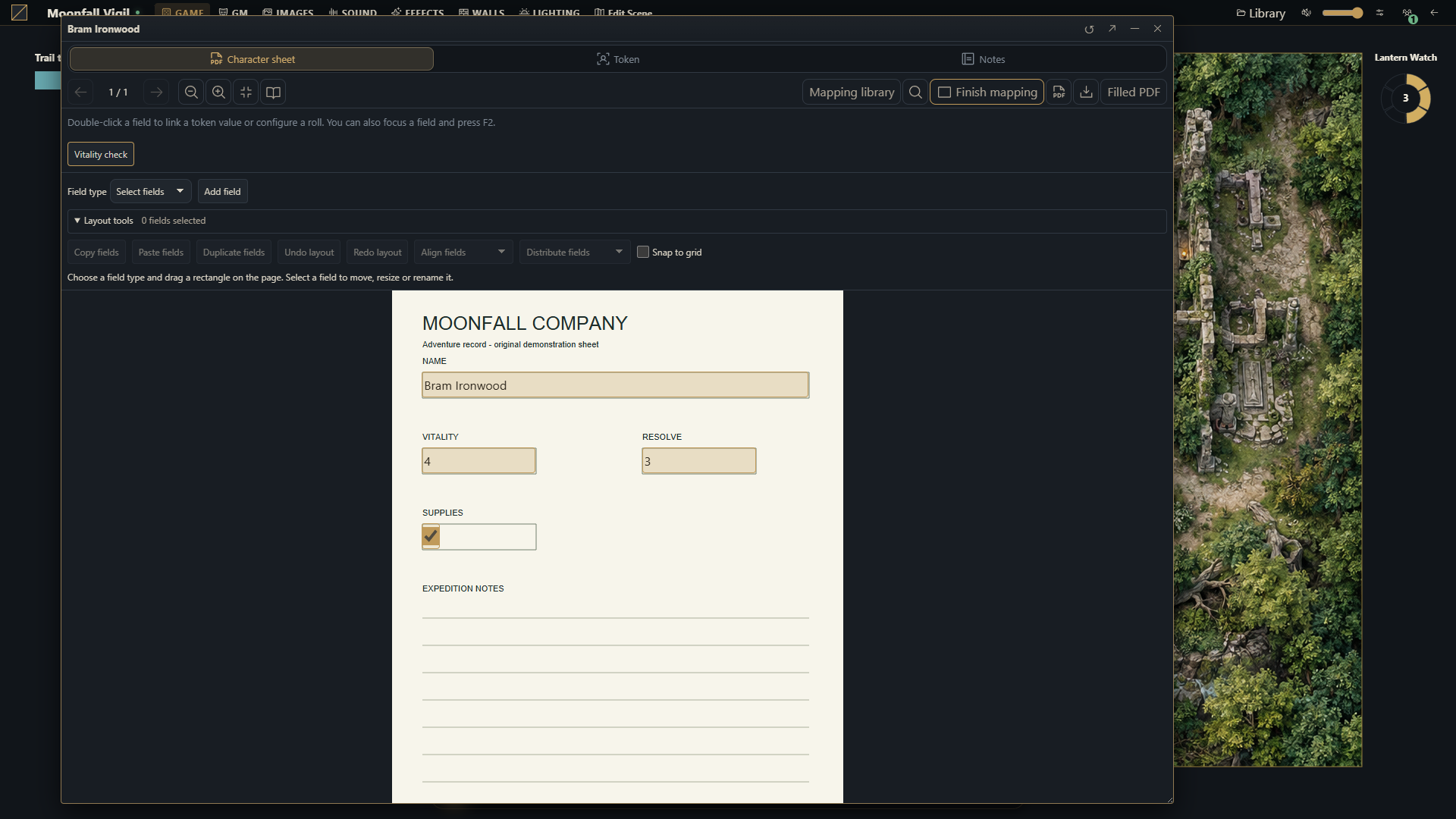
Open the actor sheet as a campaign GM and select its PDF.
Choose Map fields, then text, number, checkbox or multiline text.
Draw a rectangle over the desired page area. Add field also creates a rectangle without dragging.
Name the field and adjust its bounds. Drag to move it or use its lower-right handle to resize. Arrow keys move it one displayed pixel; Shift moves ten.
Choose Finish mapping to fill the fields. Changes save through the normal sheet workflow.
Rectangles use page-relative coordinates and stay aligned during zoom and page navigation. The GM configures the layout; participants with sheet editing rights fill its values. Existing PDF widgets remain usable. Removing a rectangle keeps its stored value. The original PDF is unchanged.
Use Shift/Ctrl-click or a selection rectangle for multiple fields. Layout tools offers copy/paste, duplication, alignment, distribution and optional five-point snapping. Ctrl+C/V/D and Ctrl+Z/Shift+Z provide clipboard and history shortcuts. History keeps 50 layout steps for the active PDF and preserves current character values when undoing. Switching documents clears that layout history.
Field actions, token bars and formulas
As GM, double-click a native or manual field, or focus it and press F2, to open Field actions. Select a token value, configure a roll label and formula, or choose a preset. The six presets are d20, highest or lowest of two d20s, 2d6, exploding d6 and 4dF. Number and single-line text fields can supply token bars. Changing a binding preserves its current value.
| Formula | Meaning |
|---|---|
1d20 + @value | Roll with this field's current numeric value |
2d6 | Roll without reading the field's value |
1d20 + @{field-key} | Read the numeric value of another mapped field |
Use Reference field to insert an existing field's exact key. Manual keys remain stable when a field is renamed. Native names containing braces or backslashes are escaped by the picker. Empty values are zero; checkboxes are zero or one. Other nonnumeric inputs prevent the roll. See the dice notation for supported roll expressions.
Saving an action validates it without rolling dice. Authorized editors execute saved actions with the buttons above the PDF or Alt+Enter on a focused field. Players can also double-click configured fields. A GM's double-click opens configuration; Roll saved action runs the previously saved action. Results use native dice/chat visibility, scene context and retry receipts.
Calculated value formula uses deterministic arithmetic, comparisons and
numeric functions with @{field-key} references. Calculated fields are read-only.
The server recomputes them in dependency order on sheet saves and rejects cycles,
including cycles through token-bar aliases. If a calculation temporarily fails,
the previous canonical result remains available and diagnostics explain the issue.
Clear the formula to return the field to ordinary editing.
Reuse mappings
Mapping library lets campaign GMs save or replace a mapping template, apply it to the current sheet or selected actors, and import/export versioned JSON. Mappings contain rectangles, roll actions, calculations, field/bar bindings and optional document metadata. They contain no PDF bytes, character values or media.
Apply a template to the same PDF layout. Values are retained by field identity and canonical bars, rather than merged by visible labels. Batch application validates every target revision before committing any changes. A template update does not automatically change sheets that used its older definition.
Actor sheets and independent token snapshots have separate state. Applying a template to the actor does not rewrite its independent snapshots; an open snapshot must be targeted explicitly. Mapping JSON does not authorize distributing the source PDF or its contents. Campaign archives preserve the mapping library.
Diagnose and export
PDF mapping diagnostics reports missing fields/references, calculation problems, absent pages and differences from saved page dimensions, rotation or document fingerprint. It can navigate to fields that are still present. The campaign preparation dashboard also reports missing PDFs and saved calculation problems; actual page geometry is checked when opening the sheet.
Filled PDF renders every page and its current values into a separate, flattened PDF at 144 dpi. It includes manual fields and repeated native widgets, and contains no editable form widgets or executable PDF content. The original download remains available separately. Export fails rather than truncating overflowing text or returning an incomplete document. Closing the sheet or switching its PDF cancels the work.
Limits and integration
| Resource | Limit |
|---|---|
| Manual fields / roll actions / calculated fields | 256 of each per sheet, across PDF sources |
| Field bindings | 1,024 per sheet |
| Roll formula / label | 512 / 48 characters |
| Mapping templates | 128 per campaign |
| Mapping JSON import / batch application | 1 MB / 100 actors |
| Filled PDF | 100 pages, 16 million pixels per page, 128 million pixels per operation, 100 MB output |
All writes recheck membership, sheet permissions, source identity and revisions. After a conflict, review fresh state before saving; use the same operation UUID only to retry the same operation. Layout changes and templates require a GM. Streamers remain read-only. Text in the host's controls passes through Translator; authored names, formulas and document content retain their wording.
Browser integrations discover the campaign system with await api.system.state()
and call its pdf.* operations through api.system.call(). Python integrations
use the public api.pdf_system facade or the api.systems dispatcher. See the API guide for
payloads, token contexts, revisions, templates and diagnostics. PDF inspection,
flattened rendering and layout history run in the browser; server diagnostics
inspect stored mappings and an optional observed descriptor without parsing PDF
bytes. Implementation and verification entry points are in
Frontend architecture and Testing.