
How to create a journal module
Build, install and run a normal module that creates private journals and appends saved GM session drafts.
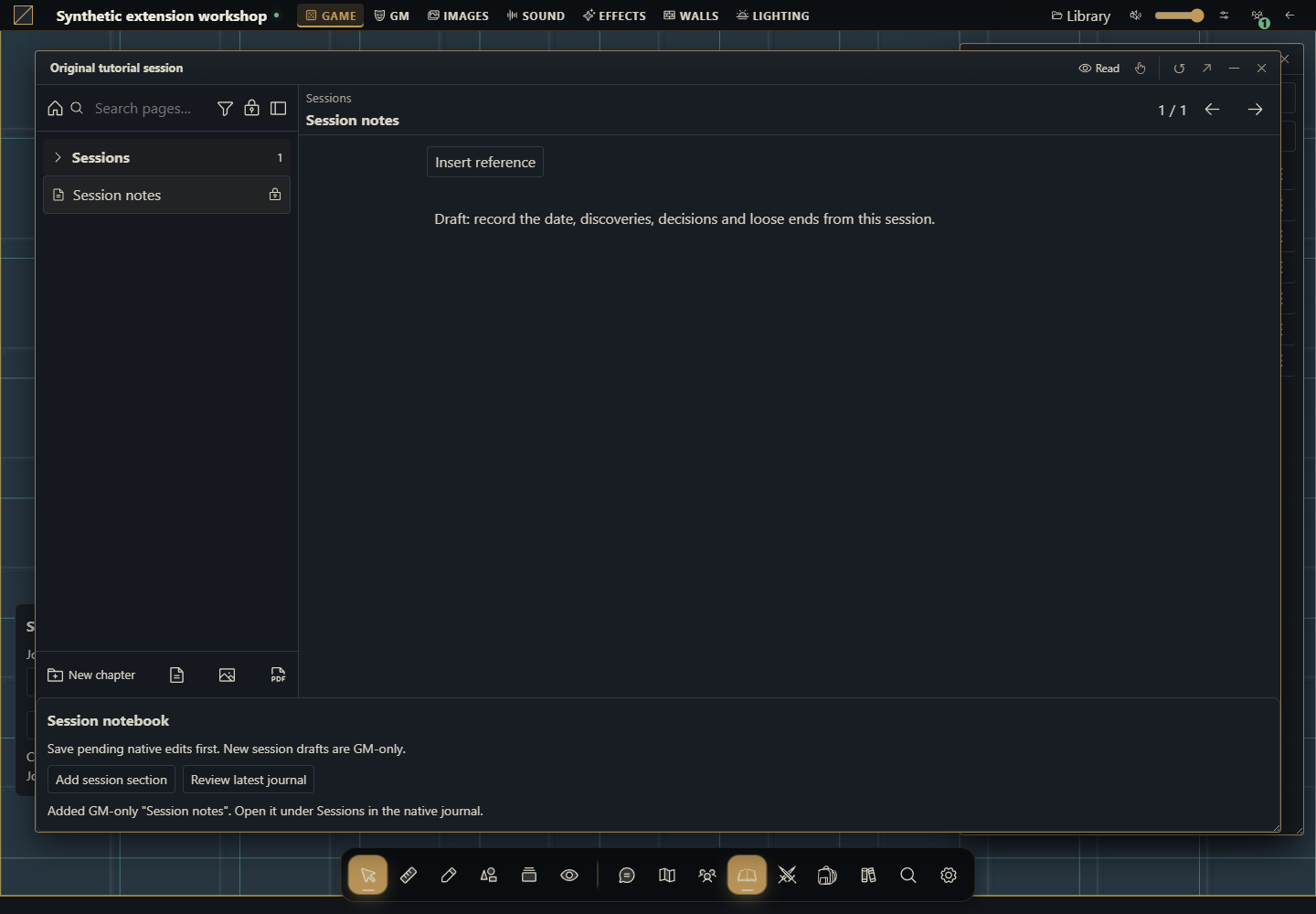
What you will build
A normal browser module for Gravewright 0.3.0 with two working actions: create a private journal from the table, then append a session draft to an existing journal. The sheet action is Add session section. It writes a Session notes page under Sessions, containing original draft text with audience gm. It preserves the existing authored text.
The package uses public api.journals.state, create and update. It imports no private host code and requires no Django app. Both surfaces use mode: augment, retaining the native editor.
1. Start with the files
Use a disposable development installation of host0.3.0, an installation-owner account for installation and a GM account in a campaign. You need a text editor and the project's prepared Python environment. There are no npm dependencies or frontend build. Create a session-journal folder under data/ or another explicitly chosen development directory. Save the five files as UTF-8.
session-journal/
  manifest.json
  main.js
  styles.css
  messages.json
LICENSE.txt2. Understand the different types
| Concept | This example | Meaning |
|---|---|---|
| Package type | browser module | Manifest has entry and no system/django/locales; there is no manifest kind: journal |
| Surfaces | table.interface and journal.sheet | Where the module mounts |
| Document type | diary | Native Journal; the other types are quest, quest_board and roll_table |
| Page kind | text | New section contains text; image/pdf pages have different resource needs |
| Page audience | gm | Draft page is omitted from player projections |
Do not change an existing document's type to fit this example. Quests and roll tables require their own data contracts. The tool explicitly refuses those types.
3. Package the project
From the directory containing the five files, run in PowerShell:
python -m json.tool manifest.json
Compress-Archive -LiteralPath manifest.json,main.js,styles.css,messages.json,LICENSE.txt -DestinationPath ../session-journal-1.0.0.zip
python -m zipfile -l ../session-journal-1.0.0.zip
On Linux/macOS:
python3 -m json.tool manifest.json
python3 -m zipfile -c ../session-journal-1.0.0.zip manifest.json main.js styles.css messages.json LICENSE.txt
python3 -m zipfile -l ../session-journal-1.0.0.zip
The archive listing must show manifest.json at its root beside main.js. This is an unsigned local source package. You can instead review and install the downloadable source ZIP. Do not add an extra outer directory.
4. Install as owner and activate as GM
As installation owner, open Inside → Modules → Install module → Install from ZIP.
Select
session-journal-1.0.0.zipand click Install. Local installation is the owner's explicit trust decision.Open the campaign as GM. Select the table's Gravewright button → Extensions, then Activate version 1.0.0 of Session notebook. Installation alone does not activate a campaign module.
Close Extensions. The bottom-left panel contains Journal title and Create session journal.
When changing the source later, increment to 1.0.1, build/install a new ZIP and activate that version. Installed releases are immutable; do not edit their extracted files.
Your first module explains each installation screen.
5. Create and open a journal from scratch
Keep the default title Session notebook and click Create session journal once. It sends
{title, journal_type: "diary", folder_id: null}to create with a fresh operation UUID.Wait for confirmation. Open Journals at the table and open Session notebook. The host creates an empty private journal at the directory root.
Native creation does not consume a module data field. The next sheet action writes the session draft. Do not invent a create parameter for initial content.
If creation is not confirmed, inspect Journals before clicking again. Cancellation or a lost response cannot undo a write already committed by the server.
6. Act on an existing journal
In the opened journal, find the added Session notebook panel. The native editor remains available.
If you were editing, wait for the native Saved indicator first. The public module API does not supply a command to flush another editor's local draft.
Click Add session section. It reads a current server projection, preserves title, visibility, introduction, cover, pages and GM documents, then appends a page.
In the native index, open Sessions → Session notes. It reads:
Draft: record the date, discoveries, decisions and loose ends from this session.The page is GM-only. Edit it using the native editor. To share it, deliberately choose the native Make public option and suitable journal permissions. The module does not automatically publish or present content.
Close/reopen to verify persistence. A second click after the first operation finishes creates another independent page with a fresh ID. Overlapping clicks in one mount are blocked.
7. Understand writes and conflicts
journals.update takes journal_id, title, visibility, the integer version read from the server and the complete data object. For diary, data contains content, cover, sections and gm. Do not use the entire projection as data: its field names differ, including content_doc and cover_image. Each page's can_edit is projection metadata and is removed before saving.
This example writes only from a GM projection because a player's filtered projection is incomplete. The UI checks context.role, and each write separately verifies state.is_gm. The server still checks the authenticated member, campaign, permissions and revision. A player with journal editing rights continues to use the native editor.
If another window saves between reading and writing, update returns conflict. The module rereads current state, blocks Add and requests Review latest journal. Review native content and resolve local drafts before confirming the review. It never automatically retries or silently replaces version. Each later approved click is a fresh logical operation with a new UUID.
8. Complete source
start loads CSS and catalogs through the official translation API. register synchronously declares both surfaces. Every mount owns its state; every read/write receives signal. Closing or deactivating aborts the mount, removes its listeners and disposes its panel. Labels support en, pt-BR and es; original draft titles/text remain unchanged across locales.
manifest.json
{
  "id": "example.session-notebook",
  "name": "Session notebook",
  "version": "1.0.0",
  "sdk": {
    "requires": ">=1.0.0 <2.0.0",
    "tested": "1.0.0"
  },
  "entry": "main.js",
  "description": "Create private journals and append GM-only session drafts while preserving existing journal content.",
  "author": "Gravewright documentation examples",
  "license": "MIT"
}
main.js
// Original tutorial. MIT. Target host: Gravewright 0.3.0, SDK 1.x.
const error = key => Object.assign(new Error(key), { tutorialKey: key });
const alive = signal => !signal.aborted;

function elements({ root, signal, onDispose, api }, kind) {
  const el = (tag, text) => {
    const node = root.ownerDocument.createElement(tag);
    if (text !== undefined) node.textContent = text;
    return node;
  };
  const t = (key, params) => api.i18n.t(key, params);
  const panel = el('section');
  panel.className = 'gw-session-tools gw-session-tools--' + kind;
  const heading = el('h3', t('Session notebook'));
  const status = el('p');
  status.setAttribute('role', 'status');
  status.setAttribute('aria-live', 'polite');
  panel.append(heading);
  root.append(panel);
  onDispose(() => panel.remove());
  const report = problem => {
    if (!alive(signal)) return;
    status.textContent = problem.tutorialKey ? t(problem.tutorialKey) :
      t('Request failed: {code}. Review the journal before trying again.', { code: problem.code || 'unavailable' });
  };
  return { el, t, panel, status, report };
}

async function journalSnapshot(api, signal, journalId) {
  const snapshot = await api.journals.state({}, { signal });
  if (!alive(signal)) return null;
  // Only the server's GM projection contains all pages, hidden blocks and GM docs.
  if (snapshot.is_gm !== true) throw error('This tool requires a GM.');
  const view = snapshot.journals.find(row => row.id === journalId);
  if (!view || view.can_open === false) throw error('Journal is unavailable.');
  if (view.type !== 'diary') throw error('This tool only edits Journal documents (diary).');
  if (!view.can_edit) throw error('This journal is read-only.');
  if (!Array.isArray(view.sections) || !view.content_doc || !view.cover_image ||
      !view.diary?.gm?.notes || !view.diary?.gm?.secrets || !Number.isInteger(view.version)) {
    throw error('The complete GM journal projection is unavailable.');
  }
  return view;
}

function appendPayload(view) {
  if (view.sections.length >= 64) throw error('This journal already has 64 pages.');
  const last = Math.max(0, ...view.sections.map(page => Number(page.sortOrder) || 0));
  if (!Number.isSafeInteger(last + 10)) throw error('Page order is outside the supported range.');
  const page = {
    id: 'section_' + crypto.randomUUID().replaceAll('-', '').slice(0, 12),
    title: 'Session notes', category: 'Sessions', kind: 'text',
    assetId: '', src: '', level: 1, audience: 'gm', sortOrder: last + 10,
    content: { format: 'gw-journal-doc-v1', version: 1, doc: { type: 'doc', content: [
      { type: 'paragraph', attrs: { visibility: 'public' }, content: [
        { type: 'text', text: 'Draft: record the date, discoveries, decisions and loose ends from this session.' }
      ] }
    ] } }
  };
  const sections = view.sections.map(({ can_edit, ...section }) => structuredClone(section));
  return {
    journal_id: view.id, title: view.title, visibility: view.visibility, version: view.version,
    data: {
      content: structuredClone(view.content_doc), cover: structuredClone(view.cover_image),
      sections: [...sections, page], gm: structuredClone(view.diary.gm)
    }
  };
}

async function mountCreate(block) {
  const { context, api, signal } = block;
  if (context.role !== 'gm' || !alive(signal)) return;
  const { el, t, panel, status, report } = elements(block, 'table');
  const form = el('form');
  const label = el('label', t('Journal title'));
  const input = el('input');
  input.type = 'text'; input.required = true; input.maxLength = 120;
  input.value = 'Session notebook';
  const create = el('button', t('Create session journal'));
  create.type = 'submit';
  label.append(input); form.append(label, create); panel.append(form, status);
  let busy = false;
  form.addEventListener('submit', async event => {
    event.preventDefault();
    if (busy || !alive(signal)) return;
    const title = input.value.trim();
    if (!title || title.length > 120) { report(error('Enter a title from 1 to 120 characters.')); return; }
    busy = true; create.disabled = true; input.disabled = true;
    status.textContent = t('Creating journal...');
    try {
      const snapshot = await api.journals.state({}, { signal });
      if (!alive(signal)) return;
      if (snapshot.is_gm !== true) throw error('This tool requires a GM.');
      const result = await api.journals.create({ title, journal_type: 'diary', folder_id: null },
        { requestId: crypto.randomUUID(), signal });
      if (!alive(signal)) return;
      status.textContent = t('Created "{title}". Open it in Journals, then add a session section.', { title });
      status.dataset.journalId = result.journal_id;
    } catch (problem) { report(problem); }
    finally { if (alive(signal)) { busy = false; create.disabled = false; input.disabled = false; } }
  }, { signal });
}

async function mountAppend(block) {
  const { context, api, signal } = block;
  if (context.role !== 'gm' || !alive(signal)) return;
  const { el, t, panel, status, report } = elements(block, 'journal');
  const add = el('button', t('Add session section'));
  const review = el('button', t('Review latest journal'));
  add.type = review.type = 'button';
  add.disabled = review.disabled = true;
  const hint = el('p', t('Save pending native edits first. New session drafts are GM-only.'));
  panel.append(hint, add, review, status);
  let busy = false, ready = false, needsReview = false;
  const controls = () => {
    if (!alive(signal)) return;
    add.disabled = busy || !ready || needsReview;
    review.disabled = busy;
  };
  async function refresh() {
    if (busy || !alive(signal)) return;
    busy = true; ready = false; controls();
    try {
      const view = await journalSnapshot(api, signal, context.journalId);
      if (!view || !alive(signal)) return;
      ready = view.sections.length < 64;
      needsReview = false;
      status.textContent = t('Latest saved version: {version}. Pages: {count}.', { version: view.version, count: view.sections.length });
      if (!ready) report(error('This journal already has 64 pages.'));
    } catch (problem) { report(problem); }
    finally { if (alive(signal)) { busy = false; controls(); } }
  }
  review.addEventListener('click', () => void refresh(), { signal });
  add.addEventListener('click', async () => {
    if (busy || !ready || needsReview || !alive(signal)) return;
    busy = true; controls();
    status.textContent = t('Saving session section...');
    try {
      const view = await journalSnapshot(api, signal, context.journalId);
      if (!view || !alive(signal)) return;
      const payload = appendPayload(view);
      await api.journals.update(payload, { requestId: crypto.randomUUID(), signal });
      if (!alive(signal)) return;
      ready = payload.data.sections.length < 64;
      status.textContent = t('Added GM-only "Session notes". Open it under Sessions in the native journal.');
    } catch (problem) {
      if (!alive(signal)) return;
      needsReview = true;
      if (problem.code === 'conflict') {
        try {
          const latest = await journalSnapshot(api, signal, context.journalId);
          if (!latest || !alive(signal)) return;
          ready = latest.sections.length < 64;
          status.textContent = t('Conflict: server version {version} loaded. Review native content, then choose Review latest journal. No automatic retry.', { version: latest.version });
        } catch (refreshProblem) { ready = false; report(refreshProblem); }
      } else report(problem);
    } finally { if (alive(signal)) { busy = false; controls(); } }
  }, { signal });
  await refresh();
}

export default {
  async start({ api, assets, styles, signal }) {
    styles.use('styles.css');
    const messages = await assets.json('messages.json');
    if (!alive(signal)) return;
    api.i18n.register(messages);
  },
  register({ register }) {
    register('table.interface', { mode: 'augment', mount: mountCreate });
    register('journal.sheet', { mode: 'augment', mount: mountAppend });
  },
  stop() {}
};
styles.css
.gw-module-root[data-module-id="example.session-notebook"] .gw-session-tools {
  padding: var(--space-3, 12px); border: 1px solid var(--border);
  border-radius: var(--radius-md); background: var(--surface); color: var(--text);
  font-size: 14px; line-height: 1.5; pointer-events: auto;
}
.gw-module-root[data-module-id="example.session-notebook"] .gw-session-tools--table {
  position: fixed; left: 16px; bottom: 128px; z-index: 10;
  width: min(320px, calc(100vw - 32px)); max-height: 40vh; overflow: auto;
}
.gw-module-root[data-module-id="example.session-notebook"] .gw-session-tools h3 {
  margin: 0 0 var(--space-2, 8px); font-size: 16px;
}
.gw-module-root[data-module-id="example.session-notebook"] .gw-session-tools p {
  margin: var(--space-2, 8px) 0 0; font-size: 14px;
}
.gw-module-root[data-module-id="example.session-notebook"] .gw-session-tools label {
  display: grid; gap: var(--space-1, 4px); margin-bottom: var(--space-2, 8px);
}
.gw-module-root[data-module-id="example.session-notebook"] .gw-session-tools input,
.gw-module-root[data-module-id="example.session-notebook"] .gw-session-tools button {
  font: inherit; max-width: 100%; box-sizing: border-box;
}
.gw-module-root[data-module-id="example.session-notebook"] .gw-session-tools button {
  margin-right: var(--space-2, 8px); margin-top: var(--space-2, 8px);
}
.gw-module-root[data-module-id="example.session-notebook"] .gw-session-tools input { width: 100%; }
messages.json
{
  "en": {
    "Session notebook": "Session notebook",
    "Journal title": "Journal title",
    "Create session journal": "Create session journal",
    "Add session section": "Add session section",
    "Review latest journal": "Review latest journal",
    "Save pending native edits first. New session drafts are GM-only.": "Save pending native edits first. New session drafts are GM-only.",
    "This tool requires a GM.": "This tool requires a GM.",
    "Journal is unavailable.": "Journal is unavailable.",
    "This tool only edits Journal documents (diary).": "This tool only edits Journal documents (diary).",
    "This journal is read-only.": "This journal is read-only.",
    "The complete GM journal projection is unavailable.": "The complete GM journal projection is unavailable.",
    "This journal already has 64 pages.": "This journal already has 64 pages.",
    "Page order is outside the supported range.": "Page order is outside the supported range.",
    "Enter a title from 1 to 120 characters.": "Enter a title from 1 to 120 characters.",
    "Creating journal...": "Creating journal...",
    "Created \"{title}\". Open it in Journals, then add a session section.": "Created \"{title}\". Open it in Journals, then add a session section.",
    "Latest saved version: {version}. Pages: {count}.": "Latest saved version: {version}. Pages: {count}.",
    "Saving session section...": "Saving session section...",
    "Added GM-only \"Session notes\". Open it under Sessions in the native journal.": "Added GM-only \"Session notes\". Open it under Sessions in the native journal.",
    "Conflict: server version {version} loaded. Review native content, then choose Review latest journal. No automatic retry.": "Conflict: server version {version} loaded. Review native content, then choose Review latest journal. No automatic retry.",
    "Request failed: {code}. Review the journal before trying again.": "Request failed: {code}. Review the journal before trying again."
  },
  "pt-BR": {
    "Session notebook": "Caderno de sessão",
    "Journal title": "Título do diário",
    "Create session journal": "Criar diário de sessão",
    "Add session section": "Adicionar seção de sessão",
    "Review latest journal": "Revisar diário atual",
    "Save pending native edits first. New session drafts are GM-only.": "Salve as alterações pendentes do editor nativo antes. Novos rascunhos de sessão são privados do GM.",
    "This tool requires a GM.": "Esta ferramenta exige GM.",
    "Journal is unavailable.": "O diário está indisponível.",
    "This tool only edits Journal documents (diary).": "Esta ferramenta só edita documentos do tipo Diário (diary).",
    "This journal is read-only.": "Este diário permite apenas leitura.",
    "The complete GM journal projection is unavailable.": "A projeção completa do diário para GM está indisponível.",
    "This journal already has 64 pages.": "Este diário já tem 64 páginas.",
    "Page order is outside the supported range.": "A ordem das páginas está fora do intervalo suportado.",
    "Enter a title from 1 to 120 characters.": "Digite um título de 1 a 120 caracteres.",
    "Creating journal...": "Criando diário...",
    "Created \"{title}\". Open it in Journals, then add a session section.": "Diário \"{title}\" criado. Abra em Diários e adicione uma seção de sessão.",
    "Latest saved version: {version}. Pages: {count}.": "Versão salva atual: {version}. Páginas: {count}.",
    "Saving session section...": "Salvando seção de sessão...",
    "Added GM-only \"Session notes\". Open it under Sessions in the native journal.": "Página privada \"Session notes\" adicionada. Abra em Sessions no diário nativo.",
    "Conflict: server version {version} loaded. Review native content, then choose Review latest journal. No automatic retry.": "Conflito: versão {version} do servidor carregada. Revise o conteúdo nativo e escolha Revisar diário atual. Sem repetição automática.",
    "Request failed: {code}. Review the journal before trying again.": "Falha na solicitação: {code}. Revise o diário antes de tentar novamente."
  },
  "es": {
    "Session notebook": "Cuaderno de sesión",
    "Journal title": "Título del diario",
    "Create session journal": "Crear diario de sesión",
    "Add session section": "Añadir sección de sesión",
    "Review latest journal": "Revisar diario actual",
    "Save pending native edits first. New session drafts are GM-only.": "Guarda primero los cambios pendientes del editor nativo. Los borradores nuevos son privados del GM.",
    "This tool requires a GM.": "Esta herramienta requiere GM.",
    "Journal is unavailable.": "El diario no está disponible.",
    "This tool only edits Journal documents (diary).": "Esta herramienta solo edita documentos Diario (diary).",
    "This journal is read-only.": "Este diario es de solo lectura.",
    "The complete GM journal projection is unavailable.": "La proyección completa del diario para GM no está disponible.",
    "This journal already has 64 pages.": "Este diario ya tiene 64 páginas.",
    "Page order is outside the supported range.": "El orden de páginas está fuera del intervalo permitido.",
    "Enter a title from 1 to 120 characters.": "Escribe un título de 1 a 120 caracteres.",
    "Creating journal...": "Creando diario...",
    "Created \"{title}\". Open it in Journals, then add a session section.": "Diario \"{title}\" creado. Ábrelo en Diarios y añade una sección de sesión.",
    "Latest saved version: {version}. Pages: {count}.": "Versión guardada actual: {version}. Páginas: {count}.",
    "Saving session section...": "Guardando sección de sesión...",
    "Added GM-only \"Session notes\". Open it under Sessions in the native journal.": "Página privada \"Session notes\" añadida. Ábrela en Sessions en el diario nativo.",
    "Conflict: server version {version} loaded. Review native content, then choose Review latest journal. No automatic retry.": "Conflicto: versión {version} del servidor cargada. Revisa el contenido nativo y elige Revisar diario actual. Sin repetición automática.",
    "Request failed: {code}. Review the journal before trying again.": "Solicitud fallida: {code}. Revisa el diario antes de intentar otra vez."
  }
}
LICENSE.txt
MIT License

Copyright (c) 2026 Gravewright documentation contributors

Permission is hereby granted, free of charge, to any person obtaining a copy
of this software and associated documentation files (the "Software"), to deal
in the Software without restriction, including without limitation the rights
to use, copy, modify, merge, publish, distribute, sublicense, and/or sell copies
of the Software, and to permit persons to whom the Software is furnished to
do so, subject to the following conditions:

The above copyright notice and this permission notice shall be included in all
copies or substantial portions of the Software.

THE SOFTWARE IS PROVIDED "AS IS", WITHOUT WARRANTY OF ANY KIND, EXPRESS OR
IMPLIED, INCLUDING BUT NOT LIMITED TO THE WARRANTIES OF MERCHANTABILITY,
FITNESS FOR A PARTICULAR PURPOSE AND NONINFRINGEMENT. IN NO EVENT SHALL THE
AUTHORS OR COPYRIGHT HOLDERS BE LIABLE FOR ANY CLAIM, DAMAGES OR OTHER
LIABILITY, WHETHER IN AN ACTION OF CONTRACT, TORT OR OTHERWISE, ARISING FROM,
OUT OF OR IN CONNECTION WITH THE SOFTWARE OR THE USE OR OTHER DEALINGS IN THE
SOFTWARE.
9. Validate before adapting
| Case | Procedure | Expected result |
|---|---|---|
| Basic write | Create, open, add, reopen | One persisted GM page containing the original draft |
| Existing content | Use a cover, introduction, public page, GM page and GM notes/secrets | Existing fields survive unchanged; exactly one page is appended |
| Player | Share the journal and open another account | No module write controls; GM draft and secrets absent from projection |
| Read-only | Open as reader; revoke editing during a mount | No allowed write; server remains the authorization boundary |
| Other types | Open Quest, Quest board or Roll table | Type warning and no update |
| Limit | Use a64-page diary | Add blocked; no existing page discarded |
| Conflict | Two sessions; interleave a save between the other's read/write | Reread and explicit review, without automatic retry |
| Lifecycle | Open/close five times; deactivate during a read | One panel per window; no late DOM updates |
| Submitted write | Close during update | Abort does not promise rollback; reopen and inspect |
From the website source, run node --test scripts/tutorial-journals.test.mjs. The behavioral tests execute this package against isolated API/DOM adapters and check writes/lifecycle. They complement visual testing at the table.
How to use AI to extend this module
Adapt example.session-notebook for Gravewright 0.3.0 to [describe a journal action]. Read frontend.json, domain-api.js, journal.sheet.context.json and this release journal validators. Preserve introduction, cover, public/private pages, GM notes/secrets, visibility and version. Keep full-document writes restricted to the complete GM projection and the native editor augmented. Deliver the whole package, en/pt-BR/es labels, installation/activation steps and tests for writes, page limits, player access, conflict and disposal during a request. Do not invent package kind journal, call private endpoints or retry by replacing the expected version.