
Browser module: a campaign summary
A complete package with a table action, authorized API read and native modal.
Goal and prerequisites
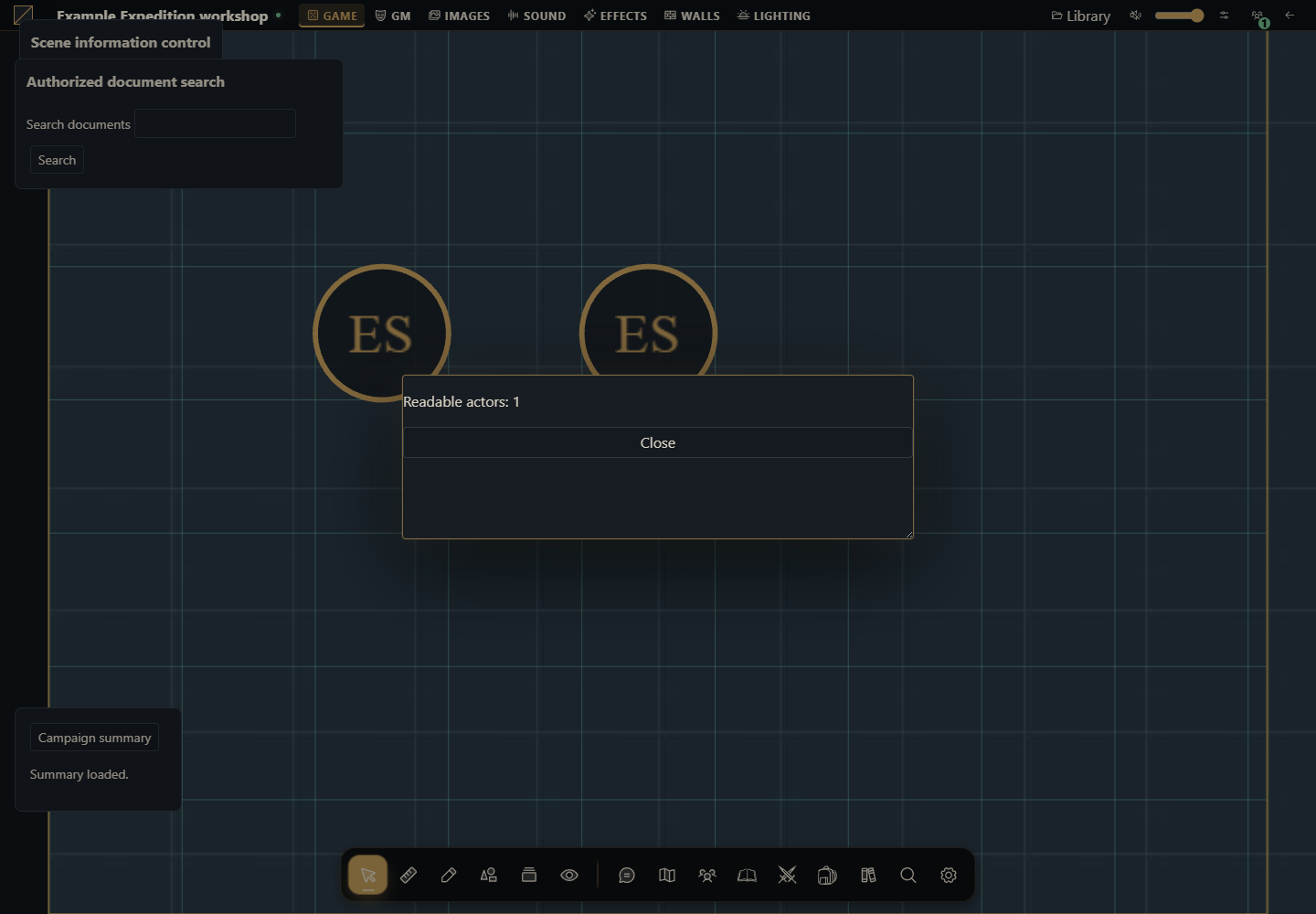
Add a Campaign summary button to table.interface. Clicking it reads only the actors visible to the signed-in user and opens the result in the existing modal component.
Target host: 0.3.0, SDK 1.0.0. Sample interface strings are English. Preserve the requested version when adapting.
Complete files
These are complete unsigned sources. After reviewing the code, test with Install from ZIP on a disposable host. Marketplace publication uses the signature/catalog described in signing and activation. No private signing key is included.
Complete manifest
{
  "id": "example.campaign-summary",
  "name": "Example campaign summary",
  "version": "1.0.0",
  "sdk": {
    "requires": ">=1.0.0 <2.0.0",
    "tested": "1.0.0"
  },
  "description": "Adds an authorized read-only summary in a native modal.",
  "author": "Gravewright documentation examples",
  "license": "GPL-3.0-only",
  "entry": "main.mjs"
}
Example code
main.mjs
export default {
  start({styles}) { styles.use('styles.css'); },
  register({register}) {
    register('table.interface', ({root, api, signal, onDispose}) => {
      const doc=root.ownerDocument;
      const panel=doc.createElement('section');
      panel.className='example-panel';
      const button=doc.createElement('button');
      button.type='button';
      button.textContent='Campaign summary';
      const status=doc.createElement('p');
      status.setAttribute('role','status');
      panel.append(button,status);
      root.append(panel);
      let modal;
      button.addEventListener('click', async () => {
        button.disabled=true;
        try {
          const actors=await api.actors.list({}, {signal});
          if(signal.aborted) return;
          if(modal) await modal.close();
          if(signal.aborted) return;
          const content=doc.createElement('section');
          content.setAttribute('role','dialog');
          content.setAttribute('aria-modal','true');
          content.setAttribute('aria-label','Campaign summary');
          const text=doc.createElement('p');
          text.textContent='Readable actors: '+actors.filter(actor=>actor.canOpen).length;
          const close=doc.createElement('button');
          close.type='button';close.textContent='Close';
          content.append(text,close);
          modal=api.ui.openModal(content);
          close.addEventListener('click',()=>void modal.close(),{signal});
          status.textContent='Summary loaded.';
        } catch(error) {
          if(!signal.aborted) status.textContent=error.code || 'unavailable';
        } finally { if(!signal.aborted) button.disabled=false; }
      },{signal});
      onDispose(()=>{panel.remove();});
    });
  },
  stop() {}
};
styles.css
.gw-module-root .example-panel { padding: var(--space-4, 16px); font-size: 14px; }
.gw-module-root .example-panel label { display: block; margin-bottom: var(--space-3, 12px); }
.gw-module-root .example-panel button { margin-right: var(--space-2, 8px); }
.gw-module-root[data-module-id="example.campaign-summary"] .example-panel { position: fixed; left: 16px; bottom: 112px; z-index: 20; max-width: min(360px, calc(100vw - 32px)); border: 1px solid var(--border); border-radius: var(--radius-md); background: var(--surface); color: var(--text); pointer-events: auto; }
How to run
Review the source ZIP and install it through Modules → Install from ZIP on a disposable host, then enable its exact installed version for a campaign.
Open the table and click Campaign summary. A native modal displays the readable actor count. Close it with the button or Escape.
Repeat as a player with access to fewer actors. Reopen/close and deactivate the module while a read is pending.
Expected result and lifecycle
The GM and player can receive different counts. There is no write operation. The host owns modal cleanup, focus and background state; mount disposal removes the panel and aborts its listeners.
Errors and limits
permission_denied indicates the caller lacks access; stale_context indicates an ended mount/activation. A network failure is shown in the status paragraph. The button stays disabled while loading to prevent duplicate requests.
How to validate
Check the real count against the caller’s actor directory.
Verify Escape restores focus and native UI remains available.
Leave the table or deactivate the module during loading; no modal may open afterward.
How to use AI with this example
Adapt the campaign-summary example to show [authorized read-only metric]. Keep table.interface, the supplied scoped API, native modal and abort/disposal behavior. Verify the target release signatures and test GM/player results.