
How to include compendiums in a system
Build the complete package from an empty directory, install it and verify its original content.
What you will build
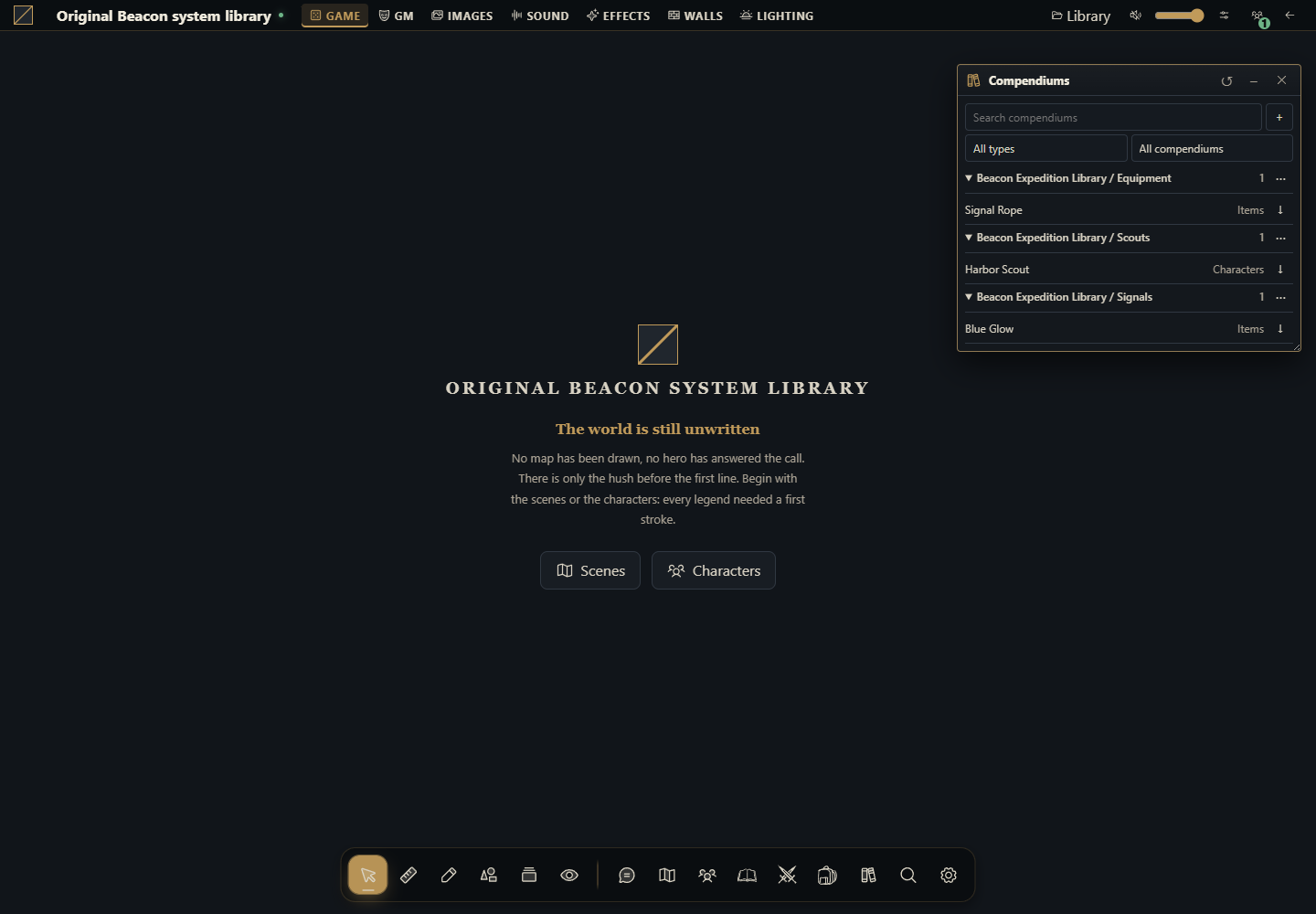
Create one system package named Beacon Expedition Library, containing actor/item descriptors and a physical compendium file. Once installed and selected for a campaign, Compendiums will show Scouts, Equipment and Signals. The GM imports Harbor Scout, Signal Rope and Blue Glow.
Use this route for original content shipped with a system. Unlike the campaign library module, no JavaScript click creates the collection: installation validates its declared JSON and the host exposes it only with the campaign's active exact system version. Installed catalogs are read only; imports create campaign documents that evolve independently.
Use Gravewright 0.3.0, a disposable installation and the owner account for installation. The GM selects the campaign system and imports documents. This package is complete as a type/content provider; its entry registers no sheets or rules. For an editable custom sheet extend this same package using the sheet example.
1. Start with an empty directory
Create system-library and its compendiums subdirectory. Save every file from section 4. manifest.json registers system and content; main.mjs implements start/register/stop without running actions; compendiums/beacon.json contains the actual content; LICENSE.txt travels with the package. There is no separately installed Modules companion.
system-library/
  manifest.json
  main.mjs
  compendiums/beacon.json
LICENSE.txt2. Understand the binding before packaging
The system ID is example.beacon-library. It appears in the manifest and every entry's systemId. actor_pack uses character from system.actorTypes. item_pack uses gear and spell_pack uses spell, both declared in system.itemTypes. The core routes spell_pack to items; it does not implement spell rules.
content.compendiums points exactly to compendiums/beacon.json. The file has a collection name and packs array; each pack has id, label, type and entries. Each entry has id, name, type, systemId and data. Do not add campaigns: the host associates the collection with the active campaign. Do not put journal_pack, scene_pack, card_pack or deck_pack in this package; installation accepts only actor_pack, item_pack and spell_pack.
3. Package, install and select
Start in the directory containing system-library and use one command below. Both include the nested JSON at its correct path with manifest.json at the root. Use python3 on POSIX where appropriate.
POSIX
cd system-library
python -m zipfile -c ../system-library-source.zip "manifest.json" "main.mjs" "compendiums/beacon.json" "LICENSE.txt"
PowerShell
Set-Location -LiteralPath .\system-library
python -m zipfile -c ..\system-library-source.zip "manifest.json" "main.mjs" "compendiums/beacon.json" "LICENSE.txt"
List the archive with python -m zipfile -l ../system-library-source.zip to check manifest.json and compendiums/beacon.json. As owner open Inside → Systems → Install system → Install from ZIP, select it and click Install. Open a test campaign using Beacon Expedition Library as its system. Verify the exact active 1.0.0 release in its Extensions; installing a version does not automatically switch existing campaigns.
Open Compendiums and find Beacon Expedition Library / Scouts, / Equipment and / Signals. Read Harbor Scout: type is character and stamina is 8. Import through the native pack control. Repeat for Signal Rope (gear, length 12) and Blue Glow (spell, color blue). Imported actors/items appear in the campaign's directories.
4. Copy every complete file
To add original content edit JSON entries while preserving stable IDs. Add document types to the manifest before using them in entries. data belongs to the system: stamina, length, color and duration are example fields rather than host-interpreted rules. The no-op entry creates no campaign documents on activation and no duplicate catalogs on reload.
manifest.json
{
  "id": "example.beacon-library",
  "name": "Beacon Expedition Library",
  "version": "1.0.0",
  "sdk": {
    "requires": ">=1.0.0 <2.0.0",
    "tested": "1.0.0"
  },
  "entry": "main.mjs",
  "description": "Original actor and item types with three installed read-only compendium packs.",
  "author": "Gravewright documentation",
  "license": "MIT",
  "system": {
    "actorTypes": [
      {
        "id": "character",
        "label": "Character"
      }
    ],
    "itemTypes": [
      {
        "id": "gear",
        "label": "Gear"
      },
      {
        "id": "spell",
        "label": "Spell"
      }
    ]
  },
  "content": {
    "compendiums": [
      "compendiums/beacon.json"
    ]
  }
}
main.mjs
export default {
  start() {},
  register() {},
  stop() {},
};
compendiums/beacon.json
{
  "name": "Beacon Expedition Library",
  "packs": [
    {
      "id": "scouts",
      "label": "Scouts",
      "type": "actor_pack",
      "entries": [
        {
          "id": "harbor-scout",
          "name": "Harbor Scout",
          "type": "character",
          "systemId": "example.beacon-library",
          "data": {
            "stamina": 8,
            "role": "Watch keeper"
          }
        }
      ]
    },
    {
      "id": "equipment",
      "label": "Equipment",
      "type": "item_pack",
      "entries": [
        {
          "id": "signal-rope",
          "name": "Signal Rope",
          "type": "gear",
          "systemId": "example.beacon-library",
          "data": {
            "length": 12,
            "description": "An original training rope with blue knots."
          }
        }
      ]
    },
    {
      "id": "signals",
      "label": "Signals",
      "type": "spell_pack",
      "entries": [
        {
          "id": "blue-glow",
          "name": "Blue Glow",
          "type": "spell",
          "systemId": "example.beacon-library",
          "data": {
            "color": "blue",
            "duration": 1,
            "description": "An original fictional signal, with no host automation."
          }
        }
      ]
    }
  ]
}
LICENSE.txt
MIT License

Copyright (c) 2026 Gravewright contributors

Permission is hereby granted, free of charge, to any person obtaining a copy
of this software and associated documentation files (the "Software"), to deal
in the Software without restriction, including without limitation the rights
to use, copy, modify, merge, publish, distribute, sublicense, and/or sell
copies of the Software, and to permit persons to whom the Software is
furnished to do so, subject to the following conditions:

The above copyright notice and this permission notice shall be included in all
copies or substantial portions of the Software.

THE SOFTWARE IS PROVIDED "AS IS", WITHOUT WARRANTY OF ANY KIND, EXPRESS OR
IMPLIED, INCLUDING BUT NOT LIMITED TO THE WARRANTIES OF MERCHANTABILITY,
FITNESS FOR A PARTICULAR PURPOSE AND NONINFRINGEMENT. IN NO EVENT SHALL THE
AUTHORS OR COPYRIGHT HOLDERS BE LIABLE FOR ANY CLAIM, DAMAGES OR OTHER
LIABILITY, WHETHER IN AN ACTION OF CONTRACT, TORT OR OTHERWISE, ARISING FROM,
OUT OF OR IN CONNECTION WITH THE SOFTWARE OR THE USE OR OTHER DEALINGS IN THE
SOFTWARE.
5. Read through the API and grant reading
In a module mounted in the same campaign discover authorized IDs with api.compendiums.state. Packs have host-generated native: IDs; do not construct IDs from filenames. This complete function reads a Scouts entry and returns IDs usable by a GM for granting reading:
export async function inspectScout(api, signal) {
  const state = await api.compendiums.state({}, {signal});
  const pack = state.packs.find(row => row.name === "Beacon Expedition Library / Scouts");
  if (!pack) throw new Error("Activate the system version and check read grants");
  const entry = pack.entries.find(row => row.id === "harbor-scout");
  if (!entry) throw new Error("Scout entry unavailable");
  const body = await api.compendiums.read({packId: pack.id, id: entry.id}, {signal});
  return {packId: pack.id, entryId: entry.id, body};
}
export async function shareScouts(api, packId, signal) {
  return api.compendiums.setPermissions({packId, level: "read"}, {signal, requestId: crypto.randomUUID()});
}
state returns metadata; read returns the collection's original document without requiring the kind envelope of a table-created entry. For a batch in the same pack use read({packId, ids:[...]}) with 1–100 unique IDs. As GM use native permission controls or shareScouts with the discovered packId. A reader may view but cannot import. Inspect full bodies before sharing: a compendium read grant authorizes its content.
6. Verify and publish an immutable update
Check all three packs and import every entry. Reopen: the same packs remain and no document imported itself. Test a campaign using a different system; these collections must not appear as that system's content. Revoke a player's read access and check that fresh reads fail; UI controls are not the authorization boundary.
For an update preserve the package ID, file paths and pack/entry IDs; change version to 1.0.1 and edit the original JSON. Build another ZIP, install and explicitly select 1.0.1 for the campaign. Do not edit the installed extracted directory: the host verifies approved bytes and rejects different content under the same version. Stable IDs preserve references/grants. Already imported documents remain copies and are not rewritten. A new import uses the new content.
Unregistered types, mismatched systemId, missing files, invalid JSON, duplicate IDs or forbidden pack types prevent installation. A collection allows up to 8 MiB, 64 packs and 20,000 entries; an entry up to 256 KiB and depth 24. A manifest allows up to 16 collection paths. Missing/changed approved bytes, revoked packages or inactive versions make collections unavailable. Do not bypass this with assets helpers: declared collections use the authorized API.
How to use AI to add a catalog to your system
Start from tutorial-system-compendiums on Gravewright 0.3.0. Replace only original data with [authorized types/fields]. Provide the complete manifest, entry, physical collection and license. Check every systemId/type, validate with the installer/validate_collection and show Systems installation with exact-version activation. Test all three packs, players with/without reading, imports and a 1.0.1 update preserving existing copies. Keep one system package and the requested host.