Como criar um módulo que atua na ficha
Comece com uma pasta vazia e entregue uma ação real para renomear atores e tokens na ficha existente.
O resultado que você vai construir
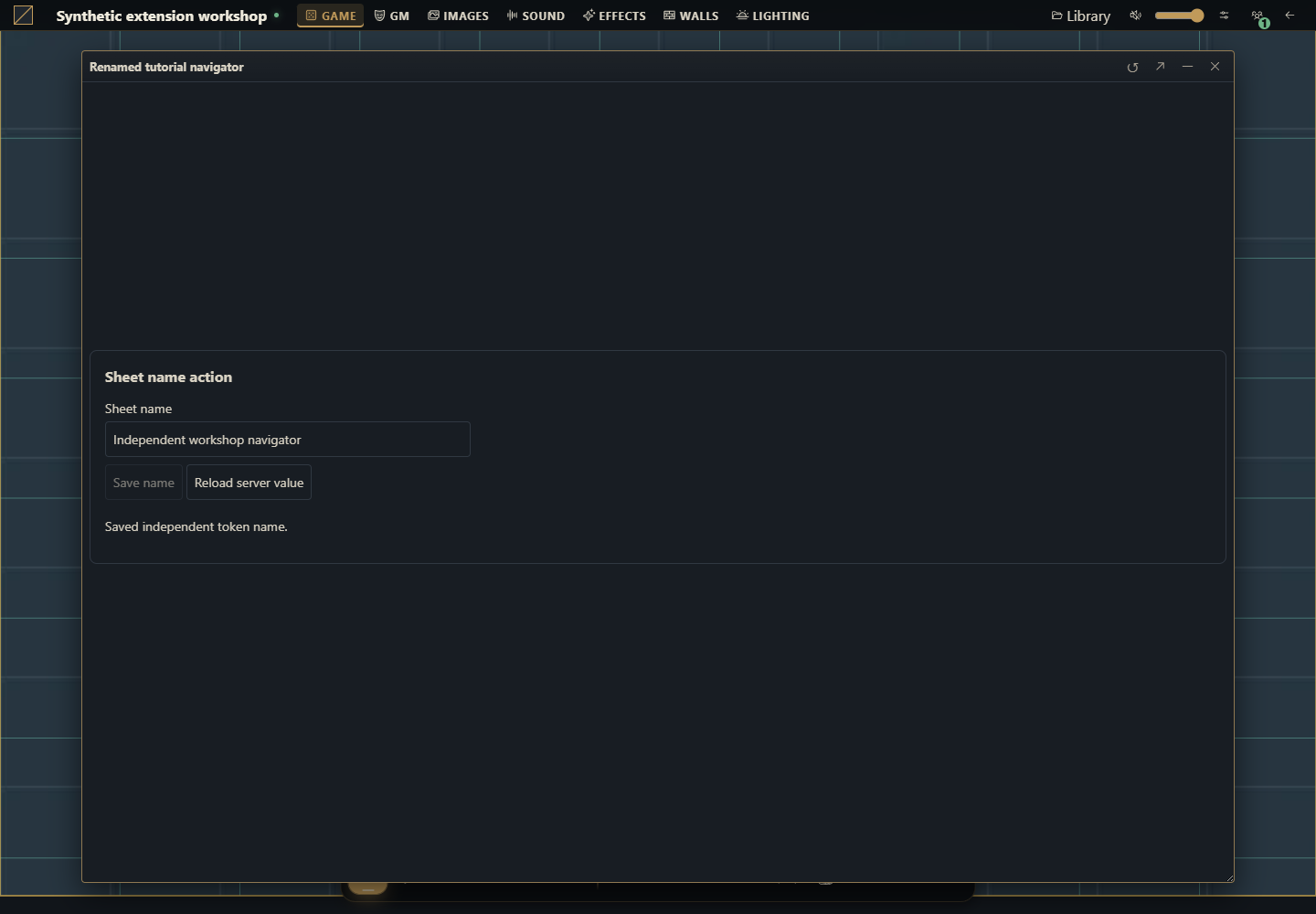
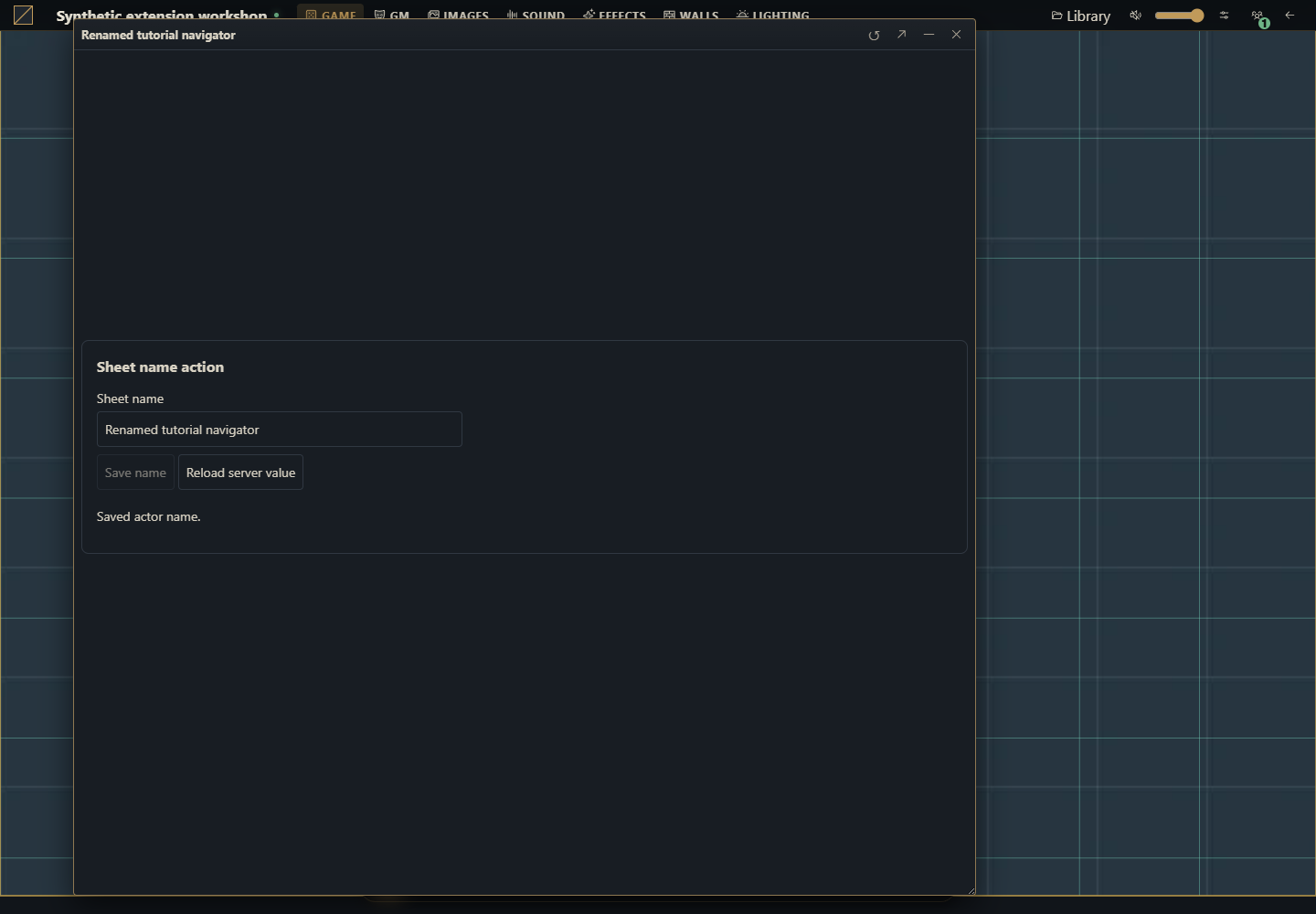
Adicione o formulário Ação no nome da ficha abaixo da ficha existente. Ele lê o documento autorizado, permite edição quando canEdit é verdadeiro, salva um nome novo e recarrega o valor confirmado. Registra actor.sheet e token.sheet: a ação atua em documentos reais.
Use uma campanha descartável no Gravewright 0.3.0, SDK 1.x, uma conta de dono para instalar e uma de mestre para ativar. A renomeação de ator funciona em qualquer sistema. Tokens independentes usam a convenção de apresentação do host data.token.name; se um sistema ocupar token com um valor que não seja objeto, o exemplo recusa essa alteração de snapshot. Não acrescenta conteúdo de livro nem atributo de RPG.
1. Crie a pasta e os cinco arquivos
Baixar ZIP completo dos fontes
example.sheet-name/
  manifest.json
  main.mjs
  styles.css
  LICENSE.txt
  README.md
Crie uma pasta chamada example.sheet-name. Salve os arquivos abaixo em UTF-8. O pacote não exige npm, bundler, app Python nem reinício do servidor. Você também pode baixar cada arquivo original:
manifest.json · main.mjs · styles.css · LICENSE.txt · README.md
manifest.json
{
  "id": "example.sheet-name",
  "name": "Sheet name action",
  "version": "1.0.0",
  "sdk": {
    "requires": ">=1.0.0 <2.0.0",
    "tested": "1.0.0"
  },
  "entry": "main.mjs",
  "description": "Rename an actor or its independent token from an existing sheet, preserving data and revisions.",
  "author": "Gravewright documentation",
  "license": "MIT"
}
main.mjs
export async function mountSheetName({root,context,api,signal,onDispose}) {
const doc=root.ownerDocument;
const t=key=>api.i18n.t(key);
const el=(tag,text)=>{const node=doc.createElement(tag);if(text)node.textContent=text;return node;};
const form=el('form');form.className='tutorial-sheet-name';
form.setAttribute('aria-label',t('Sheet name action'));
const title=el('h3',t('Sheet name action'));
const label=el('label',t('Sheet name'));
const input=el('input');input.type='text';input.maxLength=120;input.required=true;label.append(input);
const saveButton=el('button',t('Save name'));saveButton.type='submit';
const reloadButton=el('button',t('Reload server value'));reloadButton.type='button';
const status=el('p');status.setAttribute('role','status');status.setAttribute('aria-live','polite');
form.append(title,label,saveButton,reloadButton,status);root.append(form);
onDispose(()=>form.remove());
let current,dirty=false,pending,loading=false,ready=false,generation=0;
const token=context.tokenId?{tokenId:context.tokenId}:{};
function controls(){
const edit=ready&&!loading&&!pending&¤t?.canEdit;
input.disabled=!edit;saveButton.disabled=!edit||!dirty;
reloadButton.disabled=loading||!!pending;
}
function report(error){if(!signal.aborted)status.textContent=error.code||error.message||'unavailable';}
function reject(message){const error=new Error(message);report(error);return Promise.reject(error);}
async function load(){
const ticket=++generation;loading=true;ready=false;controls();
try {
const sheet=await api.actors.sheet(context.actorId,token,{signal});
if(signal.aborted||ticket!==generation)return;
if(typeof sheet.name!=='string'||!sheet.data||typeof sheet.data!=='object'||Array.isArray(sheet.data))throw new Error('invalid_data');
current=sheet;input.value=sheet.name;dirty=false;ready=true;
status.textContent=t(sheet.canEdit?'Server value loaded.':'Read-only sheet.');
} finally {if(ticket===generation&&!signal.aborted){loading=false;controls();}}
}
function save(){
if(pending)return pending;
if(!dirty)return Promise.resolve();
if(!ready||!current?.canEdit)return reject('permission_denied');
const name=input.value.trim();
if(!name||Array.from(name).length>120)return reject(t('Use a name with 1 to 120 characters.'));
const data=structuredClone(current.data),snapshot=!!current.tokenId;
if(snapshot){
if(current.tokenId!==context.tokenId)return reject('stale_context');
if(data.token!==undefined&&(!data.token||typeof data.token!=='object'||Array.isArray(data.token)))return reject(t('This system uses an incompatible token field.'));
data.token={...(data.token||{}),name};
}
const payload={actorId:context.actorId,...token,name:snapshot?current.name:name,
version:current.version,sheetVersion:current.sheetVersion,data};
const requestId=crypto.randomUUID();
pending=(async()=>{
try {
await api.actors.saveSheet(payload,{requestId,signal});
if(signal.aborted)return;
await load();
if(!signal.aborted)status.textContent=t(snapshot?'Saved independent token name.':'Saved actor name.');
} catch(error){
if(!signal.aborted){
if(error.code==='conflict'){
try {await load();if(!signal.aborted)status.textContent=t('Conflict: server value loaded. Review it and edit again.');}
catch(refreshError){ready=false;report(refreshError);}
} else {ready=false;report(error);}
}
throw error;
} finally {pending=undefined;if(!signal.aborted)controls();}
})();
controls();return pending;
}
input.addEventListener('input',()=>{dirty=true;controls();},{signal});
form.addEventListener('submit',event=>{event.preventDefault();void save().catch(()=>{});},{signal});
reloadButton.addEventListener('click',()=>{void load().catch(report);},{signal});
root.closest('.gw-window')?.addEventListener('gravewright:sheet-flush',event=>{
if(pending)event.detail.waitUntil(pending);
else if(dirty)event.detail.waitUntil(Promise.reject(new Error(t('Save the name or reload the server value before closing.'))));
},{signal});
controls();await load();
}
export default {
start({styles,api}){
styles.use('styles.css');
const en={};
const pt={
'Sheet name action':'Ação no nome da ficha','Sheet name':'Nome da ficha',
'Save name':'Salvar nome','Reload server value':'Recarregar valor do servidor',
'Server value loaded.':'Valor do servidor carregado.','Read-only sheet.':'Ficha somente leitura.',
'Saved actor name.':'Nome do ator salvo.','Saved independent token name.':'Nome do token independente salvo.',
'Use a name with 1 to 120 characters.':'Use um nome com 1 a 120 caracteres.',
'This system uses an incompatible token field.':'Este sistema usa um campo token incompatível.',
'Conflict: server value loaded. Review it and edit again.':'Conflito: valor do servidor carregado. Revise e edite novamente.',
'Save the name or reload the server value before closing.':'Salve o nome ou recarregue o valor do servidor antes de fechar.'
};
for(const key of Object.keys(pt))en[key]=key;
api.i18n.register({en,'pt-BR':pt});
},
register({register}){
register('actor.sheet',{mode:'augment',mount:mountSheetName});
register('token.sheet',{mode:'augment',mount:mountSheetName});
},
stop(){}
};styles.css
[data-module-id="example.sheet-name"] .tutorial-sheet-name { padding: var(--space-4); margin: var(--space-2); border: 1px solid var(--border); border-radius: var(--radius-md); background: var(--surface); color: var(--text); font: 14px/1.5 system-ui, sans-serif; }
[data-module-id="example.sheet-name"] .tutorial-sheet-name h3 { font-size: 16px; margin: var(--space-0) var(--space-0) var(--space-3); }
[data-module-id="example.sheet-name"] .tutorial-sheet-name label { display: block; }
[data-module-id="example.sheet-name"] .tutorial-sheet-name input { display: block; box-sizing: border-box; width: 100%; max-width: 400px; }
[data-module-id="example.sheet-name"] .tutorial-sheet-name :is(input,button) { font: inherit; padding: var(--space-2); margin: var(--space-1) var(--space-1) var(--space-1) var(--space-0); border: 1px solid var(--border); border-radius: var(--radius-sm); background: var(--surface); color: inherit; }
[data-module-id="example.sheet-name"] .tutorial-sheet-name :focus-visible { outline: 2px solid var(--accent); outline-offset: 2px; }
[data-module-id="example.sheet-name"] .tutorial-sheet-name [role=status] { overflow-wrap: anywhere; }
LICENSE.txt
MIT License

Copyright (c) 2026 Gravewright contributors

Permission is hereby granted, free of charge, to any person obtaining a copy
of this software and associated documentation files (the "Software"), to deal
in the Software without restriction, including without limitation the rights
to use, copy, modify, merge, publish, distribute, sublicense, and/or sell
copies of the Software, and to permit persons to whom the Software is
furnished to do so, subject to the following conditions:

The above copyright notice and this permission notice shall be included in all
copies or substantial portions of the Software.

THE SOFTWARE IS PROVIDED "AS IS", WITHOUT WARRANTY OF ANY KIND, EXPRESS OR
IMPLIED, INCLUDING BUT NOT LIMITED TO THE WARRANTIES OF MERCHANTABILITY,
FITNESS FOR A PARTICULAR PURPOSE AND NONINFRINGEMENT. IN NO EVENT SHALL THE
AUTHORS OR COPYRIGHT HOLDERS BE LIABLE FOR ANY CLAIM, DAMAGES OR OTHER
LIABILITY, WHETHER IN AN ACTION OF CONTRACT, TORT OR OTHERWISE, ARISING FROM,
OUT OF OR IN CONNECTION WITH THE SOFTWARE OR THE USE OR OTHER DEALINGS IN THE
SOFTWARE.
README.md
Sheet name action, target Gravewright 0.3.0 / SDK 1.x.

ZIP the contents of this folder, with manifest.json directly at its root.
An installation owner reviews and installs the ZIP under Modules, Install module,
Install from ZIP. A GM activates example.sheet-name version 1.0.0 in the campaign.
Open an actor or token sheet and find Sheet name action below the existing sheet.

Save native sheet edits first. Click Reload server value, edit Sheet name, then
Save name. Do not edit the native form and this panel simultaneously. Every save
sends both revisions read by actors.sheet and preserves all other JSON data.
Snapshot tokens use data.token.name; linked tokens rename their actor. An existing
nonobject data.token is rejected rather than replaced. The server checks access.

Closing waits for a pending save. An unsaved name blocks closing until Save name
or Reload server value. Conflicts reload the server value and never retry a write.
On an uncertain network failure, reload before editing again. Deactivation aborts
pending client work but cannot undo a write the server already committed.

See the bilingual tutorial-sheet-module guide for complete instructions and tests.
2. Monte o ZIP com o manifesto na raiz
A partir da pasta que contém example.sheet-name, execute um dos comandos. O ZIP de saída fica ao lado da pasta dos fontes e não entra dentro de si mesmo.
Compress-Archive -LiteralPath './example.sheet-name/manifest.json','./example.sheet-name/main.mjs','./example.sheet-name/styles.css','./example.sheet-name/LICENSE.txt','./example.sheet-name/README.md' -DestinationPath './example.sheet-name-source.zip'(cd example.sheet-name && zip ../example.sheet-name-source.zip manifest.json main.mjs styles.css LICENSE.txt README.md)3. Instale, ative e abra uma ficha existente
Entre como dono da instalação. Abra Módulos, Instalar módulo, Instalar por ZIP e escolha o ZIP. Revise os fontes confiáveis antes do envio. Esse caminho local não exige assinatura de catálogo.
Abra a campanha descartável como mestre. Na lista de Módulos / Extensões, ative Sheet name action 1.0.0 e mantenha o sistema já escolhido pela campanha. Instalar o pacote não o ativa.
Abra Atores, crie um personagem com o sistema ou abra um já existente e abra sua ficha. Role abaixo do conteúdo original até Ação no nome da ficha.
Salve primeiro as edições pendentes na ficha original e clique em Recarregar valor do servidor neste painel. Troque Nome da ficha para
Batedor do Portoe clique em Salvar nome. Espere Nome do ator salvo. Feche, reabra e confira o nome.
4. Entenda exatamente o que é gravado
actors.sheet(actorId, {tokenId}, {signal}) fornece os dados e as duas revisões. Para ator ou token vinculado, saveSheet recebe o novo name, version e sheetVersion exatos e uma cópia profunda de todos os data existentes. Para token independente, o servidor devolve seu tokenId e sheetVersion do snapshot; o código altera somente data.token.name, preservando os demais dados e opções do token. O ator permanece intacto. A API da montagem fixa mesa e cena; o servidor verifica novamente a propriedade.
A API pública não expõe o rascunho não salvo do editor de outro pacote. Salve a ficha original antes de recarregar este painel e evite editar os dois formulários ao mesmo tempo. Uma alteração concorrente confirmada produz conflict; o painel carrega o estado atual, descarta seu rascunho antigo e exige nova edição explícita. Não troca a revisão esperada para forçar a gravação que falhou.
5. Verifique tokens, permissões, conflitos e fechamento
Coloque um token vinculado e um independente do mesmo ator. Renomeie o vinculado: o ator reaberto deve ter esse nome. Renomeie o independente: somente seu próprio nome deve mudar. Compare dados da ficha e opções do token antes e depois.
Use um jogador com acesso somente leitura. O formulário mostra Ficha somente leitura. e bloqueia edição. Um jogador proprietário pode usar a ação; o servidor continua responsável pela permissão.
Abra o mesmo ator em duas sessões. Salve um nome em uma e tente salvar o rascunho desatualizado na outra. O valor do servidor deve ser recarregado com mensagem de conflito, sem sobrescrita automática.
Digite sem salvar e tente fechar. A janela permanece aberta e pede salvar ou recarregar. Recarregar valor do servidor descarta esse rascunho explicitamente. Durante uma gravação pendente,
gravewright:sheet-flushaguarda sua promessa; falhas mantêm a janela aberta.Desative durante uma leitura, abra a ficha três vezes e troque de cena. Painéis removidos não devem reaparecer, listeners devem encerrar e formulários não devem se acumular. Cancelar no navegador não desfaz uma gravação já confirmada no servidor.
Augment, replace e atualização de versão
Use augment para acrescentar uma ação à ficha funcional de outro sistema, como aqui. Ele recebe uma raiz própria depois do conteúdo nativo e mantém o editor. Use replace apenas ao implementar o corpo inteiro da ficha, com leitura, edição, gravação, validação e navegação. Sistemas podem filtrar tipos com types; complementos genéricos não devem presumir um tipo. A ficha do sistema da campanha tem preferência por padrão; candidatos concorrentes usam a preferência explícita de substituição da mesa. Veja o tutorial de substituição completa e as regras do SDK.
Para atualizar o pacote, mude version para 1.0.1, gere o ZIP novamente, instale e selecione essa versão exata na campanha. Não edite arquivos instalados extraídos nem substitua o mesmo ID/versão por bytes diferentes. Leia e confira os dados existentes depois da atualização.
Como usar a IA para adicionar outra ação na ficha
Use este pacote completo example.sheet-name no Gravewright 0.3.0. Adicione [uma ação concreta] em actor.sheet e token.sheet sem substituir o editor. Leia actors/services.py, domain-api.js e os dois schemas de contexto antes. Explique gravação em ator, token vinculado e independente; preserve dados e as duas revisões lidas, gere UUID novo por salvamento lógico, trate conflito sem forçar gravação, suporte somente leitura, sheet-flush nativo e liberação de recursos. Não invente acesso ao rascunho de outro pacote. Entregue todos os arquivos, instruções de ZIP e testes de comportamento, com limitações e validações executadas.Mais capturas deste guia (1)